Handle barge-in without your voice agent repeating itself
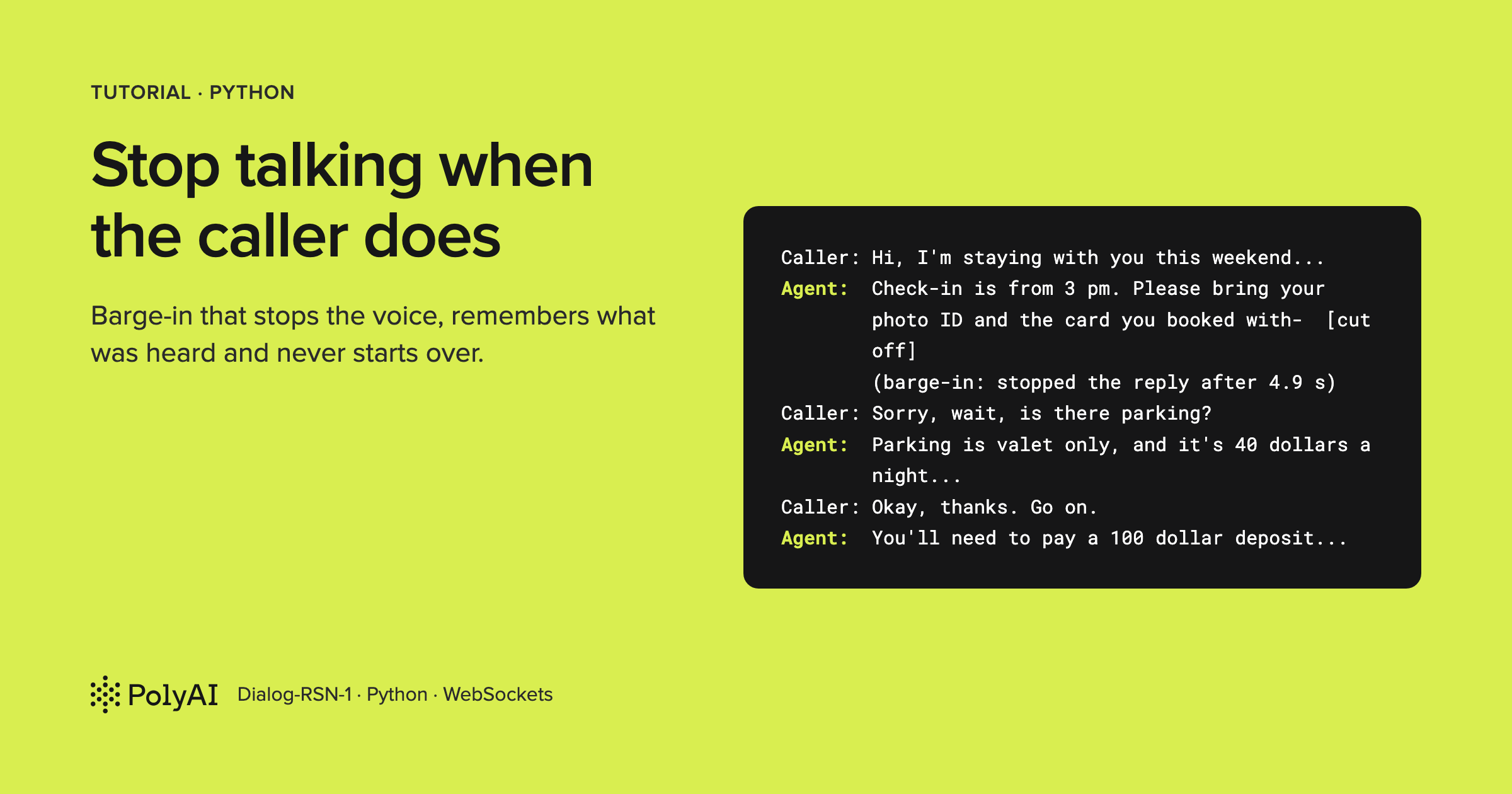
"It keeps starting over."
If you've put a voice agent on speakers, you've probably heard that one. The caller cuts in with a quick question, and the agent answers by going right back to the beginning. Then it does it again.
Here's what that looks like. The room is simulated: a scripted caller plays its lines, and the agent's voice leaks back into the microphone at 30% volume, the way laptop speakers leak into a laptop mic. The caller asks about checking in, then talks over the answer (long lines cut with "..."):
        (caller says check-in.wav)
Caller: Hi, I'm staying with you this weekend. Can you tell me everything I need to know about checking in?
Agent:  Check-in is from 3 pm. Please bring your photo ID and the card you booked with. There's a 100 dollar ...
        (caller says parking.wav)
Caller: Check-in is from three- sorry, wait, is there parking?
Agent:  Check-in is from three PM. You'll need to bring a photo ID and the card you booked with. There's a ...
        (caller says go-on.wav)
Caller: Okay, thanks, go on.
Agent:  Check-in is from three PM. You'll need to bring a photo ID and the card you booked with. There's a ...
Look at the second Caller: line. That's the agent's own voice, transcribed as the caller. It heard itself and
started over, and on this run it never answered the parking question at all.
The fix isn't in the prompt. It's in the client.
So I built a small Python client that handles barge-in on PolyAI's Dialog-RSN-1 API (the one I work on). It stops its voice once the server confirms the caller is talking. It tells the server how many milliseconds of the reply played, so history ends at "...the card you booked-" instead of holding sentences nobody heard.
It also logs what was heard, and it doesn't hear itself. I measured every piece on calls to the public API in October 2026, with a scripted caller you can run yourself, no microphone needed.
One measurement surprised me: the echo canceller that fixes speakers breaks headphones.
Code: pmckeetx/barge-in-voice-agent
What you'll build
By the end you'll have the front desk of a made-up hotel, the Harborview Inn, as a terminal voice agent of about 200 lines. Talk over it and it stops. The server's history keeps only the words that played, so when you say "go on", it carries on from there.
On speakers, an echo canceller keeps the agent's voice out of the microphone. And a booking lookup that finishes after the caller has changed the subject waits in history instead of talking over their next question.
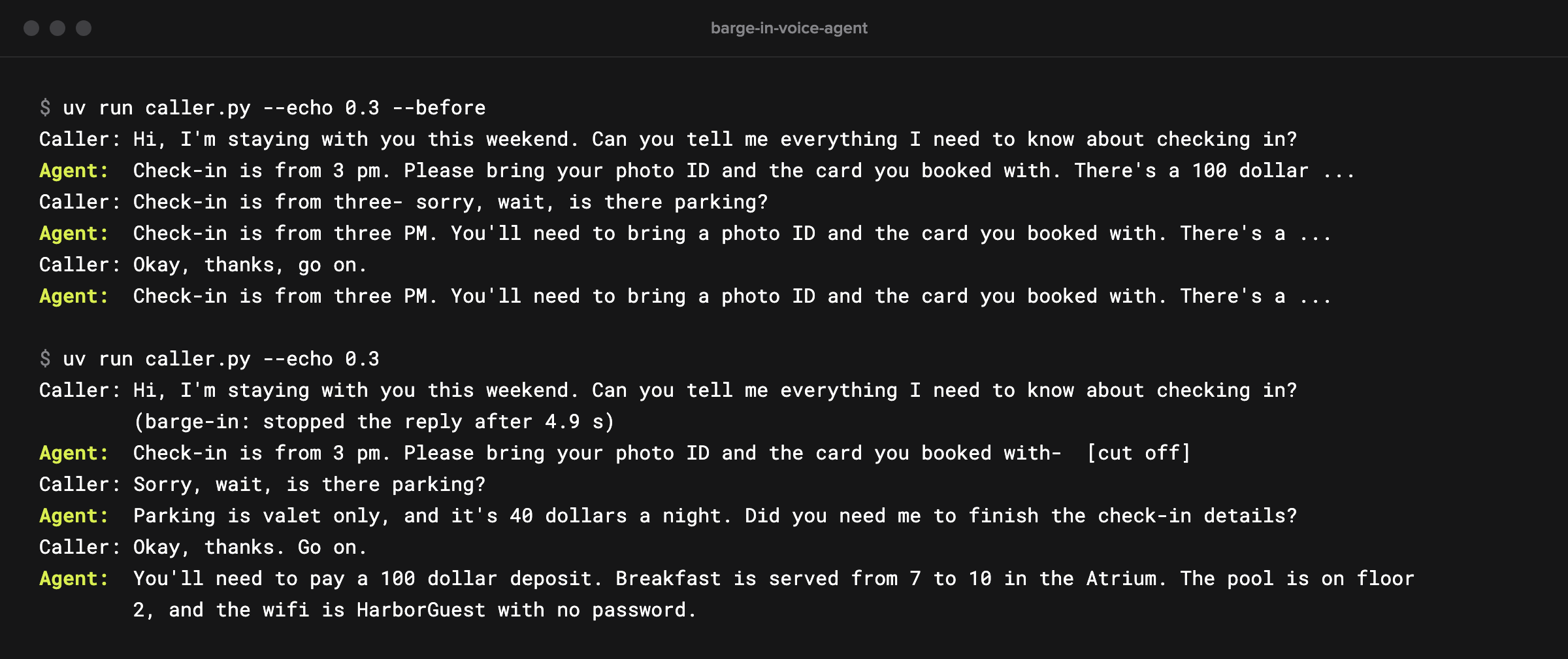
The scripted caller plays all of it through a simulated room, with or without echo, so you can compare the before and after on real calls:
How it works
A barge-in has two halves. The server owns one.
Its half is turn-taking. A voice activity detector (VAD) proposes that the caller has started talking, and while a reply is audible, Dialog-RSN-1 confirms the turn before anything happens.
Then the server sends input_audio_buffer.speech_started and cancels the reply: its response.done has
status: "cancelled". It also cuts the reply in its history to the audio it had streamed.
What gets confirmed is speech, though, not who's speaking. The docs say Dialog-RSN-1 also checks that the sound isn't its own reply echoing back, but in my runs the echo got through every time. That's step 5.
The other half is yours: your speaker, your playback buffer and your microphone, which the server can't see.
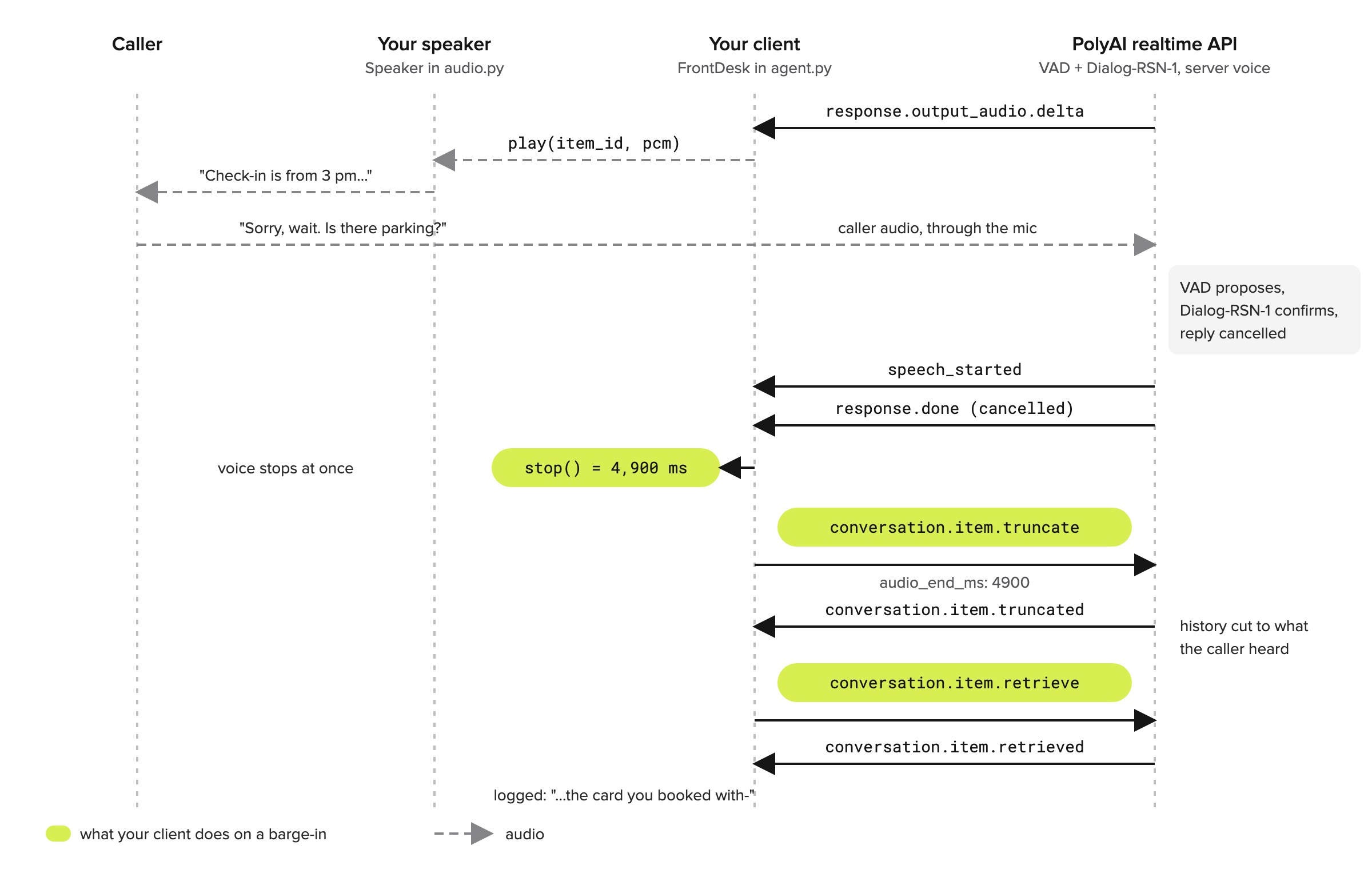
That gives the client five jobs, one step each: count what played, stop when the caller talks, tell the server where playback stopped, log what was heard, and keep the agent's voice out of the mic.
A sixth, for slow tools, closes the build.
Prerequisites
You'll need Python 3.13 and uv, which installs the dependencies from the lockfile so your setup matches mine. You'll also need a Dialog-RSN-1 API key: sign in at studio.poly.ai and create one in the API Keys tab.
The scripted caller needs nothing else. To talk to the agent yourself with agent.py, you'll need a microphone, and
headphones unless you turn on the echo canceller in step 5.
Set up the project
Clone the companion repo:
git clone https://github.com/pmckeetx/barge-in-voice-agent.git
cd barge-in-voice-agent
Copy the example environment file:
cp .env.example .env
# Your Dialog-RSN-1 API key: sign in at https://studio.poly.ai and create one in the API Keys tab.
POLY_API_KEY=

# Optional: the full realtime endpoint. Defaults to wss://api.studio.poly.ai/v1/realtime.
# DIALOG_REALTIME_URL=
Put your key after POLY_API_KEY=. Leave DIALOG_REALTIME_URL commented out unless your key is for a different
PolyAI host. Then install the dependencies:
uv sync
uv sync creates a virtual environment and installs exactly what's in uv.lock: websockets for the connection,
python-dotenv to read .env, numpy and sounddevice for audio, and livekit, which we use only for its echo
canceller in step 5.
Then run the offline tests, which need no key because a fake server plays the barge-in events in the order the real one sends them:
uv run pytest
...
tests/test_agent.py ......                                               [ 54%]
tests/test_audio.py ....                                                 [ 90%]
tests/test_live.py s                                                     [100%]

======================== 10 passed, 1 skipped in 0.81s =========================
The skipped test calls the real API. POLYAI_LIVE=1 uv run pytest -m live runs it.
Step 1: Count what the caller heard
Everything else hangs on one number: how many milliseconds of each reply reached the speaker. audio.py has a
Speaker class that keeps that count.
The agent hands it every response.output_audio.delta with speaker.play(item_id, pcm), where item_id names the
reply the audio belongs to. play() appends the audio to a queue of [item_id, audio] pairs. The sound card then
asks for the next chunk by calling pull(). Here it is, from audio.py:
    def pull(self, n: int) -> bytes:
        out = bytearray()
        with self.lock:
            while self.queue and len(out) < n:
                item_id, pcm = self.queue[0]
                take = pcm[: n - len(out)]
                del pcm[: len(take)]
                out.extend(take)
                self.played[item_id] = self.played.get(item_id, 0) + len(take)
                if not pcm:
                    self.queue.popleft()
        out.extend(b"\0" * (n - len(out)))
        if self.on_played:
            self.on_played(bytes(out))
        return bytes(out)
n is how many bytes the sound card wants, 960 for 20 ms of 16-bit audio at 24 kHz. The loop takes them from the
front of the queue, adds them to self.played for that reply, and pads with silence when the queue runs dry.
on_played hands every chunk to the echo canceller in step 5. The lock is there because a real sound card calls
pull() from its own thread.
Why count here and not when the audio arrives? Because this is the last moment your code sees the audio before the caller does.
Stopping is the other half. Here's stop():
    def stop(self) -> dict[str, int]:
        """Drop the unplayed audio. Returns {item_id: ms played} for every reply that was cut short."""
        with self.lock:
            cut = {item_id: self.played.get(item_id, 0) // BYTES_PER_MS for item_id, _ in self.queue}
            self.queue.clear()
        return cut
Every reply still in the queue was cut short, so stop() reports how far each one got, in milliseconds
(BYTES_PER_MS is 48 at this rate), and drops the rest. With nothing queued, it returns an empty dictionary. The
next step relies on that.
Step 2: Stop the voice when the caller talks
The agent's event handler is a match on the event type, and two of its cases do the barge-in work. Here's the
first, from agent.py:
            case "input_audio_buffer.speech_started":
                self.caller_turns += 1
                await self.cut_off()  # if the agent was quiet, there's nothing to stop
speech_started arrives every time the caller starts a turn. While a reply is audible, the server has already
confirmed it, so it's safe to stop at once.
When the agent was quiet, cut_off() finds an empty speaker and does nothing. caller_turns is for step 6.
The second case catches the cancellation from the other side:
            case "response.done":
                self.responding = False
                if event["response"]["status"] == "cancelled":
                    await self.cut_off()  # this can arrive before speech_started
                await self.record(event["response"])
I added this one after reading my own logs. Usually speech_started came first, but once the cancelled
response.done beat it.
Stopping on whichever arrives first costs nothing, since the second call finds an empty speaker.
NoteThe server can't stop your speaker for you.
output_audio_buffer.clearis refused over a WebSocket, so the audio you've already received is yours to drop.
Step 3: Tell the server where playback stopped
Here's cut_off(), from agent.py:
    async def cut_off(self):
        """Stop the agent's voice now, then tell the server how much of each reply the caller heard."""
        for item_id, played_ms in self.speaker.stop().items():
            await self.send({
                "type": "conversation.item.truncate",
                "item_id": item_id,
                "content_index": 0,
                "audio_end_ms": played_ms,
            })
            self.log("", f"(barge-in: stopped the reply after {played_ms / 1000:.1f} s)")
For each cut reply, it sends conversation.item.truncate with the reply's item_id, content_index 0 (a spoken
reply has one content part), and audio_end_ms, the milliseconds that played. The server answers with
conversation.item.truncated and cuts the reply in history to that point.
Does it matter? On this client, honestly, not much. I wanted to know why.
The server already trims history on a barge-in, to what it had streamed. And reply audio streams at speaking pace: on my runs, 5,147 ms of audio arrived in 4.77 s. A terminal client plays it within a fraction of a second, so the server's guess is already close.
I checked with measure.py --no-truncate, which stops playback but never truncates. History ended at the same
"...the card you booked-". "Go on" never started the rundown over, 4 runs out of 4.
The truncate earns its place when playback runs behind the stream. Think of a phone bridge, a Bluetooth headset or a jitter buffer. When I made playback lag 1.5 s, the caller had heard about 4 seconds of the reply, but the server's history ran on to "...There's a-", about 2 seconds later.
Now the agent believes it said things the caller never heard. Truncating to what played puts history back where the caller is.
TipCount
played_msat the last stage you control. If your audio goes through another buffer afterpull(), take that buffer's length off before you truncate.
Step 4: Record what was heard, not what was written
Does your app keep its own log of the call? A transcript on screen, a summary, notes for a CRM? Then there's one more trap.
When a reply is cut, the server still sends response.output_audio_transcript.done with the whole written reply,
ahead of the cancelled response.done. That's what the model wrote. It isn't what the caller heard.
So the handler stores that text and decides what to log once it knows how the response ended. Here's record(),
from agent.py:
    async def record(self, response: dict):
        """Log what the caller heard. A cut-off reply's full text never reached them, so ask the server for the heard part."""
        for item in response.get("output", []):
            if item["type"] != "message":
                continue
            if response["status"] == "cancelled":
                await self.send({"type": "conversation.item.retrieve", "item_id": item["id"]})
            else:
                self.log("Agent", self.written.get(item["id"], self.text_of(item)))
A completed reply was heard in full, so it logs the stored transcript. A cancelled one gets
conversation.item.retrieve, which returns the item as history holds it now. The answer comes back as
conversation.item.retrieved, and that's what gets logged:
            case "conversation.item.retrieved" if self.text_of(event["item"]):
                self.log("Agent", self.text_of(event["item"]) + "  [cut off]")
The difference is bigger than you'd think. On one run, the written reply went on through the deposit, breakfast, the pool, the wifi and parking.
The retrieved one stopped at "Check-in is from 3 pm. Please bring your photo ID and the card you booked-".
That trailing hyphen is the server marking the cut. The guard on the case skips an empty item, which you get when a barge-in lands a fraction of a second into a reply.
Step 5: Keep the agent from hearing itself
Everything so far assumes the microphone hears only the caller. On speakers it doesn't. That's the opening transcript.
How much echo does it take? I fed the agent's reply back into the input about 40 ms late, at 50%, 15% and 5% of its volume.
At every level, every reply was cut off about a second in, 15 out of 15. The echo came back transcribed as the caller, and the agent started the rundown again.
Steps 1 to 4 don't help here. With them in place and no canceller, the agent kept cutting itself off after about a second.
The fix is acoustic echo cancellation: subtract what the speaker played from what the microphone heard, before the
audio goes to the server. WebRTC's audio processing module does it, and the livekit package ships it for Python.
Here's the setup, from audio.py:
    def __init__(self):
        from livekit import rtc

        self.rtc = rtc
        self.apm = rtc.AudioProcessingModule(
            echo_cancellation=True, noise_suppression=False, high_pass_filter=True, auto_gain_control=False
        )
        self.far = bytearray()
        self.near = bytearray()
echo_cancellation=True does the work, and high_pass_filter removes low rumble, which helps it. Noise
suppression and automatic gain control stay off. Dialog-RSN-1 hears the caller's audio directly, and those filters
strip out what it listens to.
far and near collect audio until there's a whole 10 ms frame, the size the module works in. The canceller takes
two streams: what the speaker played (played(), wired to the speaker's on_played) and what the microphone heard
(clean()).
My first simulated room fed the echo back with no delay at all, and the canceller couldn't learn it. Real echo arrives late, through the device buffers and the air, so the simulation now adds 40 ms.
With echo at 30% and the canceller on, the agent never heard itself, 3 runs out of 3.
Then I left the canceller on with no echo in the room, which is what you'd get on headphones. Barge-in fell apart. In 4 runs out of 6, playback took 2.2 to 6.3 s to stop.
In the other 2 it never stopped, and the caller's first words went missing.
So the canceller only goes on when you're on speakers. Here's that choice, from agent.py:
    speaker = Speaker()
    echo = EchoCanceller() if speakers else None  # on headphones there's no echo to cancel, and it would hide the caller
    if echo:
        speaker.on_played = echo.played  # the canceller has to know what the speaker played
speakers comes from the --speakers flag. Without it, the agent assumes headphones and sends the microphone as
it is.
Step 6: Let a late tool result wait
The last case is a slow tool. The agent's look_up_booking takes 3 seconds; I had to make it that slow before my
scripted interruption reliably landed while it ran. Its schema marks one argument with poly_spoken, so the model
writes a holding line into the call and the API speaks it while the tool runs.
Now say the caller talks over that line and asks something else. The server cancels the line like any other reply. The tool call itself has already happened, though: its response completed the moment the call was sent.
What's left is the result, and it comes back after the caller has moved on. Here's run_tool(), from agent.py:
    async def run_tool(self, call: dict):
        turns_before = self.caller_turns
        args = json.loads(call["arguments"])
        result = await look_up_booking(args["surname"])
        self.log("", f"(look_up_booking returned for {args['surname']})")
        await self.send({
            "type": "conversation.item.create",
            "item": {"type": "function_call_output", "call_id": call["call_id"], "output": json.dumps(result)},
        })
        if self.caller_turns == turns_before:
            await self.send({"type": "response.create"})  # nobody spoke while it ran: answer with the result
        # Otherwise the caller has moved on. The result stays in history, and their new turn gets its own reply.
The output always goes back, so history pairs every call with its result. The response.create only goes if
caller_turns hasn't moved. If the caller spoke while the tool ran, their new turn gets its own reply.
At the time of writing (October 2026), the server folds a stray response.create into that turn's reply anyway (2
runs out of 2). I keep the guard because it says what I mean.
Run it
Start with the room from the top of the post, with no handling:
uv run caller.py --echo 0.3 --before
caller.py plays the WAVs in samples/ as the caller, at real speed, on a real call, and interrupts 4 seconds
into the first reply. --echo 0.3 mixes the agent's voice back into the caller's microphone at 30% volume.
--before runs a client with none of the steps, which logs every reply in full. You'll get a transcript like the
opening one.
Now the same room with the handling in. The echo canceller comes on by itself, because the room has echo:
uv run caller.py --echo 0.3
        (caller says check-in.wav)
Caller: Hi, I'm staying with you this weekend. Can you tell me everything I need to know about checking in?
        (caller says parking.wav)
        (barge-in: stopped the reply after 4.9 s)
Agent:  Check-in is from 3 pm. Please bring your photo ID and the card you booked with-  [cut off]
Caller: Sorry, wait, is there parking?
Agent:  Parking is valet only, and it's 40 dollars a night. Did you need me to finish the check-in details?
        (caller says go-on.wav)
Caller: Okay, thanks. Go on.
Agent:  You'll need to pay a 100 dollar deposit. Breakfast is served from 7 to 10 in the Atrium. The pool is on floor 2, and the wifi is HarborGuest with no password.
That's the run I was after. The agent stopped 4.9 s into its reply, at the caller's words. It answered the parking question, offered to finish, and on "go on" picked up at the deposit.
Run the plain uv run caller.py, with no echo, and it stops the same way. But you'll often see one more thing:
        (caller says check-in.wav)
Caller: Hi, I'm staying with you this weekend. Can you tell me everything I need to know about checking in?
        (caller says parking.wav)
        (barge-in: stopped the reply after 4.8 s)
Agent:  Check-in is from 3 pm. Please bring your photo ID and the card you-  [cut off]
Caller: Sorry, wait, is there parking?
Agent:  Yes, we have valet parking for forty dollars a night. Check-in is from three pm, bring your photo ID and the card you booked with. There's a one hundred dollar deposit.
        (caller says go-on.wav)
Caller: Okay, thanks. Go on.
Agent:  Breakfast is served from seven to ten in the Atrium. The pool is on floor two, and the wifi is HarborGuest with no password.
See the parking answer? It goes back over what it was saying when the caller cut in, then moves on. It did that in 5 of my 7 runs of this client, usually from the start of the cut sentence.
Why? History ends mid-sentence ("...the card you-"), and the model finishes the thought, the way a person might. A prompt line telling it not to repeat what the caller had heard didn't change that (2 runs of 4).
What never happened, in about 20 handled runs, was the whole rundown starting over.
Next, interrupt the holding line during a lookup:
uv run caller.py --script booking
        (caller says booking.wav)
Caller: Can you look up my booking? The surname is Okafor.
        (caller says never-mind.wav)
        (barge-in: stopped the reply after 1.0 s)
Agent:  Let me pull up your-  [cut off]
        (look_up_booking returned for Okafor)
Caller: Actually, never mind. What time is breakfast?
Agent:  Breakfast is served from 7 to 10 in the Atrium. Can I help with anything else?
The lookup came back after the caller had changed the subject. The agent answered the new question instead of reading out a booking nobody asked about any more.
To check the numbers on your own line, measure.py runs the call several times. --runs sets how many. It takes
the same --echo and --before flags, plus --no-truncate and --aec on (the canceller with no echo, as on
headphones):
uv run measure.py --runs 3
RUN 1: {'stopped_after_s': 0.78, 'cuts': ['4.8 s'], 'own_voice_as_caller': 0, 'answer_restates': True, 'last_reply_starts_over': False, 'last_reply': 'Breakfast is served from 7 to 10 in the Atrium. The pool is on floor 2, and the '}
...
stopped after the caller started talking: median 0.78 s, range 0.78 to 0.80 s, 3 runs; answer repeated what was heard in 3 of 3
stopped_after_s runs from the start of the caller's audio to the server's speech_started, which is when
playback stops. answer_restates flags the recap above, and last_reply_starts_over flags the restart from the
opening transcript.
Finally, talk to it yourself:
uv run agent.py
Put headphones on, ask about checking in, and talk over the answer. Add --speakers if you're on laptop speakers.
Troubleshooting
| Symptom | Likely cause | Fix |
|---|---|---|
The server refused the connection (HTTP 401) | The key is wrong, a POLY_API_KEY set in your shell is overriding .env, or the key is for another PolyAI host | echo $POLY_API_KEY, then unset POLY_API_KEY or fix .env; for another host, set DIALOG_REALTIME_URL to it |
POLY_API_KEY isn't set. | No .env file | cp .env.example .env and add your key |
The agent's own words show up as Caller: lines and it starts over | Speaker audio is reaching the microphone | Wear headphones, or run with --speakers |
| Interruptions take seconds, or the caller's first words go missing | The echo canceller is on with headphones | Drop --speakers |
| Your log shows the agent saying things the caller never heard | You're logging response.output_audio_transcript.done for cut replies | Retrieve the item after a cancelled response, as in step 4 |
| The agent skips something the caller didn't hear | Playback runs behind the stream, so the server thinks more was heard | Count played audio at the last stage you control and truncate to it |
Before you ship
My echo results come from a simulated room: a clean copy of the reply, 40 ms late, with no reverb. Real rooms are
messier, so test on your callers' hardware. Browsers have an echo canceller (echoCancellation in
getUserMedia) and phones cancel their own, so this bites desktop apps and kiosks most.
On a phone line, playback happens past buffers you don't control. Truncate to your best estimate and check it against a recording.
Tools that act for the caller can finish after they've changed their mind, so make them safe to ignore. And tell callers they're talking to an AI, and get consent before you record.
Wrapping up
I started with an agent that kept starting over. The cause wasn't the model and it wasn't the prompt. It was the agent's own voice, coming back through the microphone.
Stopping the voice and logging what was heard are cheap and always worth it. The truncate pays off once playback lags; on a client in step with the stream, the server's own trim already gets history right.
The echo canceller was the real fix, as long as it stays off for headphones.
So if your agent starts over, check what its microphone hears first. Then count what your speaker played.
The Dialog-RSN-1 overview explains how turn-taking works. The API reference has the barge-in rules, and the playback reports that do step 3's job if you voice replies with your own text-to-speech.
The code is at pmckeetx/barge-in-voice-agent. Run measure.py
on your own setup, and if your numbers differ from mine, I'd love to hear about it.
Peter McKee runs developer relations at PolyAI. He talked over this agent more times while writing this than he'd ever talk over a person.

Peter McKee
Hands-on technical leader architecting and shipping production AI systems, with three decades of engineering experience across IC, architect, and director-level roles at Docker, JFrog, AssemblyAI, and Sonar. Currently building ShrikeDB, a Redis-compatible in-memory database in Rust.
More from Peter McKee →Related posts
How to measure voice-to-voice latency in a realtime voice agent
October 29, 2026 • 22 min read
How to build a voice agent using LangChain and PolyAI's realtime voice model
October 23, 2026 • 27 min read
Add a Voice Assistant to Any Website with Dialog-RSN-1
October 22, 2026 • 18 min read