How to build a voice agent using LangChain and PolyAI's realtime voice model
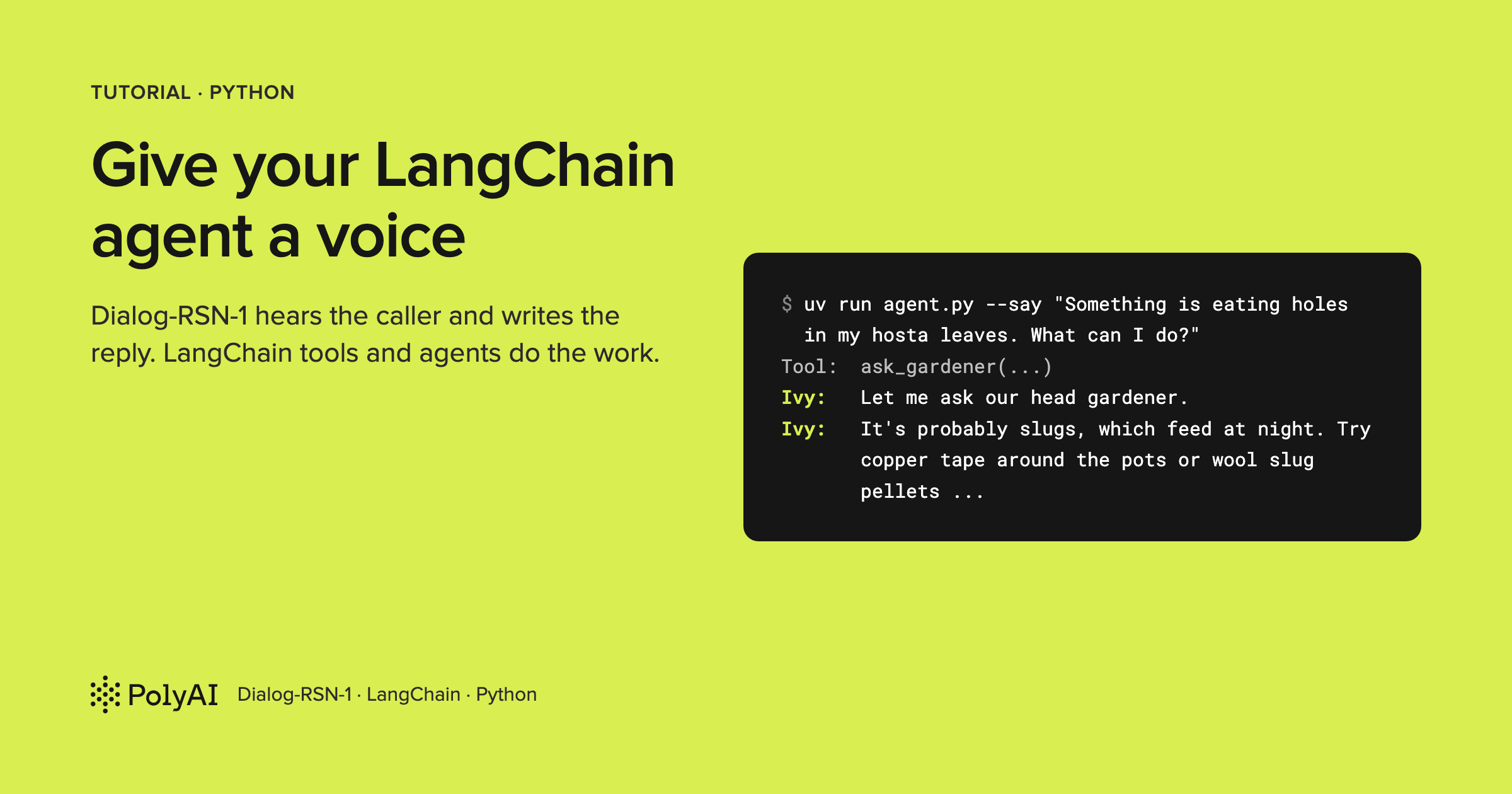
If you've built tools or an agent in LangChain, the usual way to put a voice on it is a sandwich: speech-to-text in front, your agent in the middle, text-to-speech behind. That's three services, and your code ends up deciding when the caller has stopped talking, usually with a silence timer.
In this tutorial I'll take a different route. PolyAI's Dialog-RSN-1 takes the caller's audio and writes the reply: it hears the speech directly, decides when they've finished, and answers in the same pass. PolyAI's realtime API then voices the reply on the server and streams the audio back.
LangChain keeps the job it's good at. Your @tool functions become the tools Dialog-RSN-1 calls, and a full
LangChain agent sits behind one of them for questions that need more thought. It takes about 15 minutes to run, and
the tests run without an API key.
The full code is in pmckeetx/dialog-rsn-1-langchain.
What you'll build
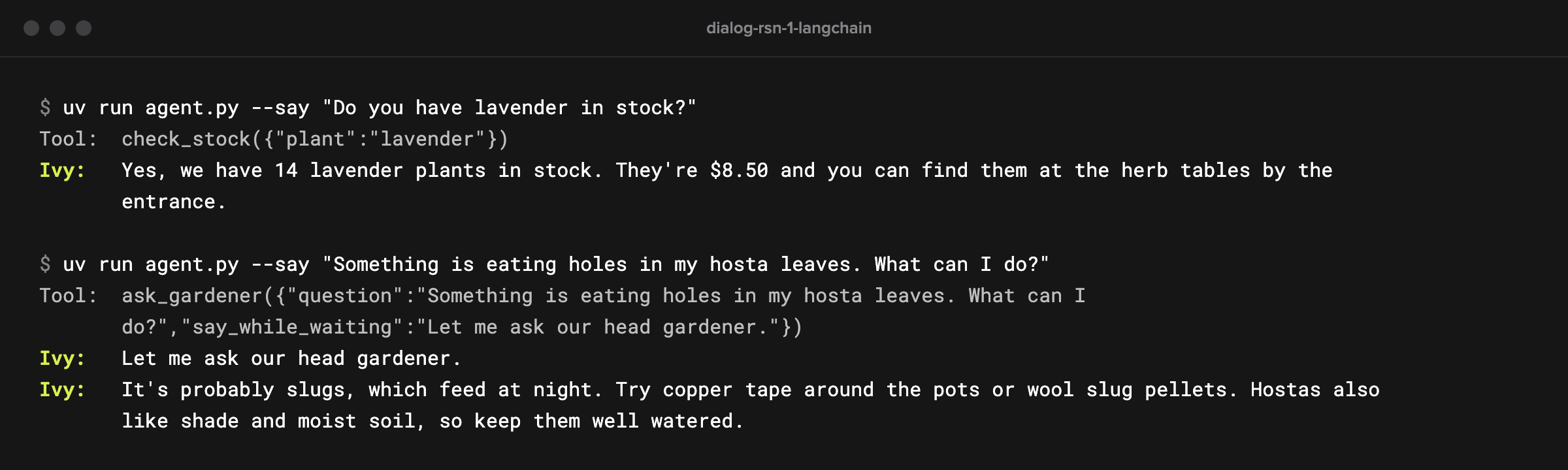
You'll build Ivy, the voice assistant at Fernbrook Garden Centre, a fictional garden shop. You talk to her from your terminal. She checks stock and prices, tells you the opening hours, and when you ask why your lavender is turning yellow, she says she'll ask the head gardener.
The head gardener is a LangChain agent running on Claude, with its own tools and its own memory of the call.
When you talk over Ivy, she stops. And a test suite runs the whole conversation against a fake server, so you can change the code without burning API calls.
How it works
Here's who does what:
 you (microphone, speakers)
   |  24 kHz audio in                          24 kHz audio out
   v                                                 ^
 agent.py  <------ one WebSocket, JSON events ------> PolyAI realtime API
   |                                                 Dialog-RSN-1 hears you, confirms the end
   |  tool calls                                     of your turn and writes the reply;
   |                                                 server text-to-speech voices it
   v
 LangChain tools: check_stock, get_opening_hours, ask_gardener
                                                       |
                                                       v
                                  create_agent on Claude Haiku 5.5
                                  with plant_care and check_stock
Dialog-RSN-1 owns the conversation. It hears your audio directly, so there's no transcript in the middle for it to misread, and it decides when you've finished, so your code has no silence timer.
It writes the reply as text, and by default the API speaks it with a server-side text-to-speech voice and streams
that audio back. If you'd rather use your own voice, output_modalities: ["text"] sends the reply as text instead
(streaming to your TTS covers that).
The protocol is compatible with the OpenAI Realtime API: you send session.update, stream
input_audio_buffer.append, and the server sends back events like response.function_call_arguments.done and
response.output_audio.delta.
agent.py is the bridge. It carries audio in both directions, and when the model asks for a tool, it runs the
LangChain tool and sends back the result. The LangChain code doesn't know it's on a phone call.
With
tools.py and expert.py, it comes to about 270 lines.
Before you begin
You'll need Python 3.13 and uv, which installs the exact dependency versions from the lockfile, so your setup matches mine. I used uv 0.13.
You'll also need two keys.
The first is a Dialog-RSN-1 key: sign in at studio.poly.ai and create one in the API Keys tab.
The second is an Anthropic key for the head gardener.
Any LangChain chat model works there: to use another provider later, set EXPERT_MODEL, add its LangChain package
with uv add, and set its key. Both keys bill by usage, so check current pricing in each console before you leave
a call running.
NoteWear headphones when you talk to Ivy. Without them, your microphone hears her through your speakers, and she stops talking because she thinks you've interrupted.
Set up the project
Clone the repo and copy the example environment file:
git clone https://github.com/pmckeetx/dialog-rsn-1-langchain.git
cd dialog-rsn-1-langchain
cp .env.example .env
Open .env and fill in the two keys. The comments say where each one comes from:
# Your Dialog-RSN-1 key: sign in at https://studio.poly.ai and create one in the API Keys tab.
POLY_API_KEY=

# For the head gardener agent (expert.py). Any LangChain chat model works: change EXPERT_MODEL and set its key.
ANTHROPIC_API_KEY=
# EXPERT_MODEL=anthropic:claude-haiku-5-5

# Optional: a different Dialog-RSN-1 endpoint. Defaults to wss://api.studio.poly.ai/v1/realtime.
# DIALOG_REALTIME_URL=
Watch outIf
POLY_API_KEYis already exported in your shell, it wins over.env, because python-dotenv never overwrites a variable that's already set.If the exported key is the right one, you can leave the line in
.envblank. If it's an old one, it shows up as an HTTP 401 later. Runecho $POLY_API_KEYif you're not sure.
Then install the dependencies:
uv sync
uv sync creates a virtual environment in .venv and installs what uv.lock lists: LangChain 1.4.7,
langchain-core 1.7.0, LangGraph 1.2.16 and langchain-anthropic 1.7.6, plus websockets for the connection,
python-dotenv for the keys and sounddevice for the microphone and speakers.
Running on Linux?
sounddeviceneeds the system PortAudio library, and without it the microphone and speaker modes fail withOSError: PortAudio library not found. Install it withsudo apt-get install libportaudio2(or your distribution's equivalent).macOS and Windows wheels include it.
--muteand the tests run without it.
Step 1: Write the tools in LangChain
Ivy's tools are ordinary LangChain tools. Here are the first two, from tools.py:
from datetime import date

from langchain_core.tools import tool

from data import CARE, HOURS, INVENTORY, find


@tool(parse_docstring=True)
def check_stock(plant: str) -> dict:
    """Check whether the garden centre has a plant in stock, its price and where to find it.

    Args:
        plant: The plant's common name, such as "lavender" or "climbing rose".
    """
    name, item = find(INVENTORY, plant)
    if item is None:
        return {"plant": plant, "found": False}
    return {"plant": name, "found": True, **item}


@tool
def get_opening_hours() -> dict:
    """Get the garden centre's opening hours for each day of the week, and today's day."""
    return {"today": date.today().strftime("%A"), "hours": HOURS}
The @tool decorator turns each function into a LangChain BaseTool, with a name, a description and a JSON
schema for its arguments, all taken from the function itself. parse_docstring=True reads the Google-style
Args: section and moves each argument's description into the schema, which matters more than it looks: that
description is all the model knows about what to put in plant.
The tools return plain dictionaries. The model reads them as JSON, so there's no need to format a sentence; Ivy turns the numbers into speech herself.
data.py holds the shop's stock, hours and care notes as
dictionaries, and find() matches a spoken name like "lavenders" or "climbing roses" to an entry. There's
nothing LangChain-specific in either, so I'll skip them.
A third tool, plant_care, looks up care notes the
same way. Ivy doesn't get that one; the head gardener does, in Step 6.
Step 2: Turn LangChain tools into realtime tools
Dialog-RSN-1 needs each tool described in the Realtime API's format. LangChain has a converter for that,
almost. Add this to agent.py:
def realtime_tool(tool: BaseTool) -> dict:
    """Describe a LangChain tool in the flat shape the Realtime API expects."""
    schema = {"type": "function", **convert_to_openai_function(tool)}
    ...
    return schema
The ... is a few lines for slow tools that Step 7 adds.
LangChain has two converters in langchain_core.utils.function_calling, and the obvious one is the wrong one
here.
convert_to_openai_tool returns the Chat Completions shape, which nests everything under a function
key.
The Realtime API wants it flat, with type next to name.
convert_to_openai_function returns the flat
part, so we add "type": "function" in front of it. Here's what check_stock becomes:
{
  "type": "function",
  "name": "check_stock",
  "description": "Check whether the garden centre has a plant in stock, its price and where to find it.",
  "parameters": {
    "properties": {
      "plant": {
        "description": "The plant's common name, such as \"lavender\" or \"climbing rose\".",
        "type": "string"
      }
    },
    "required": ["plant"],
    "type": "object"
  }
}
Note the required list. LangChain fills it from the function signature, so the model can't call
check_stock without naming a plant. A hand-written schema that leaves it out lets the model call tools with no
arguments at all.
Step 3: Open a session
Next, tell Dialog-RSN-1 who Ivy is and which tools she has. The prompt goes at the top of agent.py:
INSTRUCTIONS = """You are Ivy, the voice assistant at Fernbrook Garden Centre.
Everything you say is spoken aloud. Keep replies to one or two short sentences, with no lists or symbols.
Use check_stock for anything about stock, prices or where a plant is, and get_opening_hours for hours.
For advice about plant problems, plant care or what to plant where, use ask_gardener.
Never guess a price, a stock level or an opening time.
When the call starts, greet the caller in one short sentence."""
Write it for the ear. A reply that reads well as a bulleted list sounds terrible spoken, so the prompt asks for short sentences and no formatting. It also names each tool and when to use it, and tells Ivy never to guess the things the tools know.
The prompt and the tools go to the server in one session.update event:
def session_update(tools: list[BaseTool]) -> dict:
    return {
        "type": "session.update",
        "session": {
            "type": "realtime",
            "instructions": INSTRUCTIONS,
            "tools": [realtime_tool(t) for t in tools],
            "audio": {
                "input": {
                    "format": {"type": "audio/pcm", "rate": 24000},
                    "turn_detection": {"type": "server_vad"},
                },
            },
        },
    }
"type": "realtime" says this is a realtime conversation session. instructions is the system prompt for the
whole session, and tools is the list from Step 2.
The audio
block describes what we'll send: raw 16-bit PCM at 24 kHz, which is also the rate the server's voice streams at, so the
microphone and the speaker can share one rate.
turn_detection set to server_vad turns on turn detection: a
voice activity detector on the server proposes where your turn ends, Dialog-RSN-1 confirms it, and the server
starts the reply itself.
Both values are the defaults at the time of writing (October 2026), but I set them anyway. A client that sends audio at a different rate without saying so gets garbled turns, and defaults can change.
The VoiceAgent class holds the connection and everything the call needs to remember. Excerpt from agent.py:
class VoiceAgent:
    def __init__(self, ws, tools: list[BaseTool], speaker=None):
        self.ws = ws
        self.tools = {t.name: t for t in tools}
        self.speaker = speaker
        self.config = {"configurable": {"thread_id": "voice"}}  # LangChain config; the thread is set in start()
        self.tool_tasks: set[asyncio.Task] = set()
        self.transcript: list[tuple[str, str]] = []

    async def send(self, event: dict):
        await self.ws.send(json.dumps(event))
tools becomes a dictionary keyed by name, because the server names the tool it wants. speaker is optional, so
the tests and the --mute flag can run without audio.
config is the dictionary LangChain passes to every
Runnable; its thread_id gets the real session id in a moment.
tool_tasks holds tools that are still
running, and transcript collects every line the agent prints through its say() helper, which is also how the
tests read the conversation.
start() reads the server's first event, sends the session update and checks the answer:
    async def start(self):
        created = json.loads(await self.ws.recv())
        self.config["configurable"]["thread_id"] = created["session"]["poly_session_id"]
        await self.send(session_update(list(self.tools.values())))
        updated = json.loads(await self.ws.recv())
        if updated["type"] != "session.updated":
            # A refused update applies nothing, so the agent would run with no prompt and no tools.
            raise RuntimeError(updated.get("error", {}).get("message", f"unexpected {updated['type']}"))
Two details matter here.
The first event, session.created, carries a poly_session_id, a PolyAI addition you won't find in the OpenAI
spec. The server assigns one unless you pass ?session_id= when you connect.
We keep it in self.config, the LangChain config dictionary passed along with every tool call. Step 6 uses it to give the head gardener one
memory per call.
And if the server refuses the update, for example over a field it doesn't
support, it applies none of it (checked October 2026). The agent would then run with no prompt and no tools, so start() stops with
the server's error message instead.
The connection itself is a WebSocket with the key in a bearer header:
def connect():
    return websockets.connect(URL, additional_headers={"Authorization": f"Bearer {os.environ['POLY_API_KEY']}"})
URL defaults to wss://api.studio.poly.ai/v1/realtime and reads DIALOG_REALTIME_URL if you set it, which is
how the tests point the agent at a fake server.
Step 4: Run tool calls with LangChain
When Dialog-RSN-1 decides it needs a tool, it sends response.function_call_arguments.done with the tool's
name, its arguments as a JSON string, and a call_id. Running the tool is LangChain's job. Excerpt from
agent.py:
    async def invoke(self, call: dict) -> str:
        tool = self.tools.get(call["name"])
        try:
            args = json.loads(call["arguments"] or "{}")
            args.pop(HOLD_ARG, None)  # Already spoken by the server; the LangChain tool doesn't take it.
            result = await tool.ainvoke(args, self.config) if tool else f"Error: no tool named {call['name']}"
        except Exception as e:
            # Tell the model what went wrong so it can say so, instead of leaving the caller in silence.
            result = f"Error: {e}"
        return result if isinstance(result, str) else json.dumps(result)

    async def reply(self, call: dict, output: str):
        await self.send({
            "type": "conversation.item.create",
            "item": {"type": "function_call_output", "call_id": call["call_id"], "output": output},
        })
        await self.send({"type": "response.create"})
Skip the args.pop() line for now; it belongs to Step 7.
tool.ainvoke(args, self.config) is the same call you'd
make anywhere in LangChain. It validates the arguments
against the tool's schema and runs the function.
Passing self.config hands the session's thread id to any tool
that declares a config parameter; tools that don't, like check_stock, never see it.
If anything fails, a bad argument or an exception in the tool, the error goes back to the model as the tool's output. That's deliberate: the model can tell the caller, which beats a call that goes quiet.
reply() sends the result back in two events.
The function_call_output item carries the output, matched to
the request by call_id.
The response.create after it asks the model to carry on: it writes the reply from the
result, and the server voices it. Leave it out and the model has the answer but never says it.
listen() reads events from the WebSocket and passes each one to handle(). Excerpt from agent.py, the case
that starts each tool call as its own task:
    async def handle(self, event: dict):
        match event["type"]:
            ...
            case "response.function_call_arguments.done":
                self.say("Tool", f"{event['name']}({event['arguments']})")
                task = asyncio.create_task(self.run_tool(event))
                self.tool_tasks.add(task)
                task.add_done_callback(self.tool_tasks.discard)
A task, rather than an await, keeps the handler reading events while a tool runs. That's what lets you
interrupt Ivy while she's waiting on the head gardener.
add_done_callback(self.tool_tasks.discard) removes each
task from the set when it finishes, so the set only ever holds tools still running. The --say mode you'll use
in "Run it" checks it to know when Ivy is done, since a spoken reply with a tool still running isn't the end of
the turn.
The task runs run_tool(), which runs the tool and sends the result back, so every tool takes the same path:
    async def run_tool(self, call: dict):
        await self.reply(call, await self.invoke(call))
Step 5: Hear the caller and play Ivy's voice
Two more cases in handle() take care of the audio. Excerpt from agent.py:
            case "response.output_audio.delta" if self.speaker:
                self.speaker.play(base64.b64decode(event["delta"]))
            case "input_audio_buffer.speech_started" if self.speaker:
                self.speaker.clear()  # The caller is talking over Ivy: stop playback now.
Each response.output_audio.delta carries a slice of Ivy's voice, synthesized on the server, as PCM,
base64-encoded because every event is a JSON text message, and the speaker queues it.
The second case is
barge-in. When you start talking over Ivy, Dialog-RSN-1 checks that the sound is you and not her own voice
echoing back, then the server sends input_audio_buffer.speech_started and cancels her reply (October 2026). In
my tests, a loud enough echo of her own voice still cut her off, which is why the headphones matter.
The audio it already sent is still queued on your machine, though, so the client throws it away. Without that line, Ivy keeps talking for a moment after you've cut in.
The microphone loop lives in call():
async def call():
    """A live call on your microphone and speakers. Ctrl+C to hang up."""
    from audio import Microphone, Speaker

    async with connect() as ws:
        with Microphone() as mic, Speaker() as speaker:
            agent = VoiceAgent(ws, TOOLS, speaker)
            await agent.start()
            await agent.send({"type": "response.create"})  # Ivy greets the caller.
            print("Connected. Talk to Ivy. Ctrl+C to hang up.")

            async def stream_mic():
                while True:
                    pcm = await mic.queue.get()
                    await agent.send({"type": "input_audio_buffer.append", "audio": base64.b64encode(pcm).decode()})

            await asyncio.gather(stream_mic(), agent.listen())
There's no turn-taking code here, and that's the point. The microphone streams 20 ms chunks the whole time, silence included, because the server needs to hear the quiet to know you've stopped. It works out when you've finished, starts the reply, and cancels it if you cut in.
The
response.create before the loop makes Ivy speak first, which is how a phone call starts.
audio.py wraps
sounddevice in a Microphone that puts chunks on an asyncio queue and a Speaker that plays from a buffer.
It's plumbing, so I'll skip it.
That's a working voice agent with LangChain tools. The last two steps add the part that makes LangChain worth having here: an agent behind a tool.
Step 6: Hand harder questions to a LangChain agent
A stock check is one lookup. "Something is eating holes in my hostas, what can I do?" needs a diagnosis, the
care notes, and a look at what the shop sells. That's a job for an agent, so expert.py builds one with
LangChain's create_agent:
EXPERT_MODEL = os.environ.get("EXPERT_MODEL", "anthropic:claude-haiku-5-5")

gardener = create_agent(
    model=EXPERT_MODEL,
    tools=[plant_care, check_stock],
    system_prompt=(
        "You are the head gardener at Fernbrook Garden Centre. Answer the question using the care notes "
        "and stock tools, and suggest a product only if we stock it. Your answer is read aloud on a call, "
        "so use at most three short sentences of plain speech: no lists, markdown or symbols."
    ),
    checkpointer=InMemorySaver(),
)
model is a provider:model string, which create_agent resolves with LangChain's init_chat_model when the
module loads. Switching provider means changing EXPERT_MODEL, adding that provider's package (langchain-openai
for openai:), and setting its key. I picked Claude Haiku 5.5 for speed:
every second the gardener spends thinking is a second the caller waits.
The gardener gets plant_care and the
same check_stock tool Ivy has, so it can check the shelves before it recommends anything. Its prompt asks for spoken
answers, because Ivy will pass them on more or less word for word.
checkpointer=InMemorySaver() gives it
memory between questions, kept per LangGraph thread.
Ivy sees the whole agent as one tool:
@tool(parse_docstring=True)
async def ask_gardener(question: str, config: RunnableConfig) -> str:
    """Ask the head gardener for advice: plant problems, what to plant where, or how to care for something.

    Args:
        question: The caller's question, with any details they gave about their garden.
    """
    # One LangGraph thread per voice session, so follow-up questions have context.
    result = await gardener.ainvoke({"messages": [("user", question)]}, config)
    return result["messages"][-1].text
The config: RunnableConfig argument is where Step 3's session id comes back. LangChain fills it in from the
config passed to ainvoke, and leaves it out of the tool's schema, so Dialog-RSN-1 only ever sees
question.
Passing it on to gardener.ainvoke makes the call's poly_session_id the gardener's thread id, so
every question on one call lands in one conversation with the gardener. The tool returns the text of the agent's last message.
Watch outMy first version told Ivy to say "let me check with the gardener" and then call the tool. At the time of writing (October 2026), Dialog-RSN-1 doesn't write a reply and call a tool in the same response when you ask for it in the prompt: Ivy said the line, then stopped without calling anything.
So I removed that instruction, and the caller waited in silence while the gardener thought. In three runs on api.studio.poly.ai on 23 October 2026, the gardener took 3.9 to 5.1 seconds, and the caller heard nothing for 4.5 to 5.9 seconds. The next step fixes it.
Step 7: Say "let me check" while the agent thinks
PolyAI's realtime API has a feature for this gap: poly_spoken. Mark one string argument of a tool with
"poly_spoken": true, and when Dialog-RSN-1 calls that tool, it writes the argument as a line for the caller, in
the same response as the call. The server speaks the line while your tool runs.
The gardener tool doesn't have an argument like that, and it shouldn't need one: it's a LangChain tool that
could serve a chat app too. So the voice code adds one to the slow tools only, named at the top of agent.py:
SLOW_TOOLS = {"ask_gardener"}  # Takes seconds, so Ivy gets a line to say while it runs.
HOLD_ARG = "say_while_waiting"
And here's the part of realtime_tool() that Step 2 skipped. Excerpt from agent.py:
    if tool.name in SLOW_TOOLS:
        # poly_spoken: the model writes this argument for the caller, and the server speaks it while the tool runs.
        schema["parameters"]["properties"][HOLD_ARG] = {
            "type": "string",
            "description": "A few words to say to the caller while this runs, like 'Let me ask our head gardener.'",
            "poly_spoken": True,
        }
        schema["parameters"].setdefault("required", []).append(HOLD_ARG)
The description is the prompt for the line, so it gives an example of the length and tone. Adding the argument
to required means the model writes a line every time, instead of deciding a question is too quick to need
one. The API allows one poly_spoken argument per tool.
When the call comes back, the args.pop() line in
invoke() from Step 4 removes the argument, because the server has already spoken it and the LangChain tool
doesn't take it.
Testing the failure case turned up one more change.
With no Anthropic key, the gardener fails at once, so by the time the response carrying the spoken line finishes, no tool is running. The typed-turn mode took that line for Ivy's answer and hung up.
The answer always comes in a later response, so listen() now skips any response that
also holds a tool call. Excerpt from agent.py:
                # A spoken line that comes with a tool call isn't the answer; the answer follows the tool's output.
                if "message" in outputs and "function_call" not in outputs and not self.tool_tasks:
                    return
In five runs on api.studio.poly.ai on 23 October 2026, Ivy started saying her line 0.37 to 0.52 seconds after the
question, and the gardener's answer started 3.6 to 5.9 seconds after it. The tool's result sometimes went back
while the line was still playing; the server held that response.create until the line finished rather than
refusing it.
With no key set, Ivy said her line, then "I'm sorry, I'm having trouble reaching our head gardener right now", and offered to check the stock instead.
Run it
Start with a typed turn. --say sends one line of text instead of opening the microphone, and plays Ivy's
spoken reply.
Each one took 15 to 20 seconds in my runs, even muted: the command waits until the server has streamed the
whole spoken reply, and that arrives at speaking pace. Add --mute to print the transcript without playing
anything, if you're on a machine with no speakers:
uv run agent.py --say "Do you have lavender in stock?"
Tool:  check_stock({"plant":"lavender"})
Ivy:   Yes, we have 14 lavender plants in stock. They're $8.50 and you can find them at the herb tables by the entrance.
The Tool: line is the LangChain tool running, and the Ivy: line is the transcript of what she said. Her
wording changes from run to run. Now ask the gardener something:
uv run agent.py --say "Something is eating holes in my hosta leaves. What can I do?"
Tool:  ask_gardener({"question":"Something is eating holes in my hosta leaves. What can I do?","say_while_waiting":"Let me ask our head gardener."})
Ivy:   Let me ask our head gardener.
Ivy:   It's probably slugs, which feed at night. Try copper tape around the pots or wool slug pellets. Hostas also like shade and moist soil, so keep them well watered.
In three runs on api.studio.poly.ai on 23 October 2026, stock answers started 0.57 to 0.96 seconds after the question, tool call included. Those are typed turns. On the microphone, add the time the server waits to be sure you've finished.
Then put your headphones on and call Ivy:
uv run agent.py
Connected. Talk to Ivy. Ctrl+C to hang up.
Ivy:   Hello, Fernbrook Garden Centre. How can I help you today?
Ask what time they close on Saturday. Ask about Japanese maples, and talk over her halfway through the answer: she stops, and answers what you said instead. Then ask the gardener about your roses, and ask a follow-up.
Test it without a key
Voice agents are awkward to test: the model's wording changes run to run, and every live test costs a call. So
the repo splits the tests in two. The agent tests run the real agent code against a fake server in
tests/fake_realtime.py, which speaks enough of the protocol for one turn. Here's the part that scripts a tool
call:
        async def tool_call():
            async with playing:
                await send({"type": "response.created", "response": {"id": "resp_tool"}})
                await send({
                    "type": "response.function_call_arguments.done",
                    "name": self.tool_name,
                    "arguments": json.dumps(self.tool_args),
                    "call_id": "call_1",
                })
                outputs = [{"type": "function_call"}]
                line = next((self.tool_args[k] for k in state["spoken_args"].get(self.tool_name, []) if k in self.tool_args), None)
                if line:
                    await speak(line)
                    outputs.append({"type": "message"})
                else:
                    await asyncio.sleep(0.05)
                await send({"type": "response.done", "response": {"id": "resp_tool", "status": "completed", "output": outputs}})
The fake asks for check_stock with {"plant": "lavender"} by default, records everything the agent sends, and
replies to the next response.create with a transcript that quotes the tool's output.
If the agent's
session.update marked one of the tool's arguments poly_spoken, the fake speaks it in the same response;
otherwise it sends response.done 50 ms after the arguments (about 60 ms on api.us.poly.ai in
a probe on 23 October 2026). The playing lock holds a response.create until the line has finished.
A test then checks the
agent ran the real LangChain tool. Excerpt from tests/test_agent.py:
async def test_a_tool_call_runs_the_langchain_tool_and_asks_for_a_reply(monkeypatch):
    async with FakeRealtime() as server:
        monkeypatch.setattr(agent, "URL", server.url)
        ivy = await agent.ask("Do you have lavender?")

    assert server.headers["Authorization"] == "Bearer test-key"
    [update] = server.sent("session.update")
    assert len(update["session"]["tools"]) == 3

    [call_output] = [e["item"] for e in server.sent("conversation.item.create") if e["item"]["type"] == "function_call_output"]
    assert call_output["call_id"] == "call_1"
    assert json.loads(call_output["output"])["in_stock"] == 14
The test points the agent at the fake by patching agent.URL, then asks one typed question. It checks the key
went out as a bearer header, that session.update carried all three tools, and that the output sent back for
call_1 is the real check_stock result: 14 lavender plants, straight from data.py. The rest of the test,
in the repo, checks that a response.create follows the output.
Speaking the line in the same response as the tool call, and holding the next response.create until it ends,
as the real server does, is what let a test catch the hang in Step 7: a gardener that fails at
once, before the line has finished. Other tests check the schema conversion and that only slow tools get a
spoken argument, that an unknown tool sends an error back to the model, that a refused session.update stops the
agent, that barge-in clears the speaker, and that the gardener gets the question without the spoken line, on the
call's thread. Run them:
uv run pytest
tests/test_agent.py ......                                               [ 37%]
tests/test_live.py ss                                                    [ 50%]
tests/test_tools.py ........                                             [100%]

======================== 14 passed, 2 skipped in 1.37s =========================
The two skipped tests call the real API. They check the shape of a conversation, which tool ran and that Ivy
replied, not her exact words. Run them with this command. POLYAI_LIVE=1 switches them on (without it they
skip), and -m live selects only the tests marked live:
POLYAI_LIVE=1 uv run pytest -m live
tests/test_live.py ..                                                    [100%]
====================== 2 passed, 14 deselected in 23.97s =======================
They took about 24 seconds on api.studio.poly.ai on 23 October 2026, most of it Ivy's voice streaming in real time.
Troubleshooting
| Symptom | Likely cause | Fix |
|---|---|---|
server rejected WebSocket connection: HTTP 401 | Wrong key, or an exported POLY_API_KEY overriding .env | echo $POLY_API_KEY, then unset POLY_API_KEY or fix it |
RuntimeError with the server's message at startup | The server refused session.update, so nothing in it applied | Read the message; it names the field. Remove it or fix its value |
| Ivy stops after a word or two with no one talking | Your microphone hears your speakers | Wear headphones |
| Ivy goes quiet after a tool call | No response.create after function_call_output | Send one after every tool output, as reply() does |
| Silence while a slow tool runs | The tool isn't in SLOW_TOOLS, so it has no spoken line | Add its name to SLOW_TOOLS |
| After her holding line, Ivy says she can't reach the head gardener | The gardener failed, most often because ANTHROPIC_API_KEY is missing | Set the key for the model in EXPERT_MODEL |
ImportError: Initializing ChatOpenAI requires the langchain-openai package at startup | EXPERT_MODEL names a provider whose LangChain package isn't installed | uv add langchain-openai (or that provider's package) |
OSError: PortAudio library not found on Linux | sounddevice needs the system PortAudio library | sudo apt-get install libportaudio2 |
Before you ship
This is a terminal demo, and it skips things on purpose. The API key sits in an environment variable on the machine that talks to Dialog-RSN-1. That's fine on your laptop, but a browser or phone client should go through a server that holds the key, so callers can't read it or change Ivy's prompt.
The gardener costs money and time on every advice question. Cap how often a call can use it, log its latency, and consider caching answers to common questions.
InMemorySaver keeps every thread in memory forever, so a
long-running server wants a persistent checkpointer that expires old threads.
Set LANGSMITH_TRACING=true and
a LangSmith key, and LangSmith traces every tool call and the gardener's reasoning, but not the realtime session
itself, so log its events too.
There's no reconnect. A dropped WebSocket ends the call, and a production agent should reconnect and replay what it needs. Tool errors go to the model as text, which can include internal details, so trim them before they reach a caller.
Finally, if Ivy talks to the public, tell callers they're speaking to an AI, get consent before you record, and check the rules for outbound calls where you operate (TCPA in the US). Anything that acts on the caller's behalf, like placing an order, should confirm before it runs.
Where to go next
You now have a voice agent whose tools are plain LangChain tools, with a LangChain agent behind one of them that remembers the call, a holding line that covers its thinking time, and tests that run without a key.
From here, try putting Ivy in a web page: the
Dialog-RSN-1 browser guide shows the relay that
keeps the key on a server, and the tool code doesn't change. Or swap the gardener for an
agent you've already built, since anything you can ainvoke can sit behind a tool.
Every event and field is in the Dialog-RSN-1 reference.
Clone the repo and give it a star if it helped. If you build something with it, I'd love to see it.

Peter McKee
Hands-on technical leader architecting and shipping production AI systems, with three decades of engineering experience across IC, architect, and director-level roles at Docker, JFrog, AssemblyAI, and Sonar. Currently building ShrikeDB, a Redis-compatible in-memory database in Rust.
More from Peter McKee →Related posts
Add a Voice Assistant to Any Website with Dialog-RSN-1
October 22, 2026 • 18 min read