Add a Voice Assistant to Any Website with Dialog-RSN-1
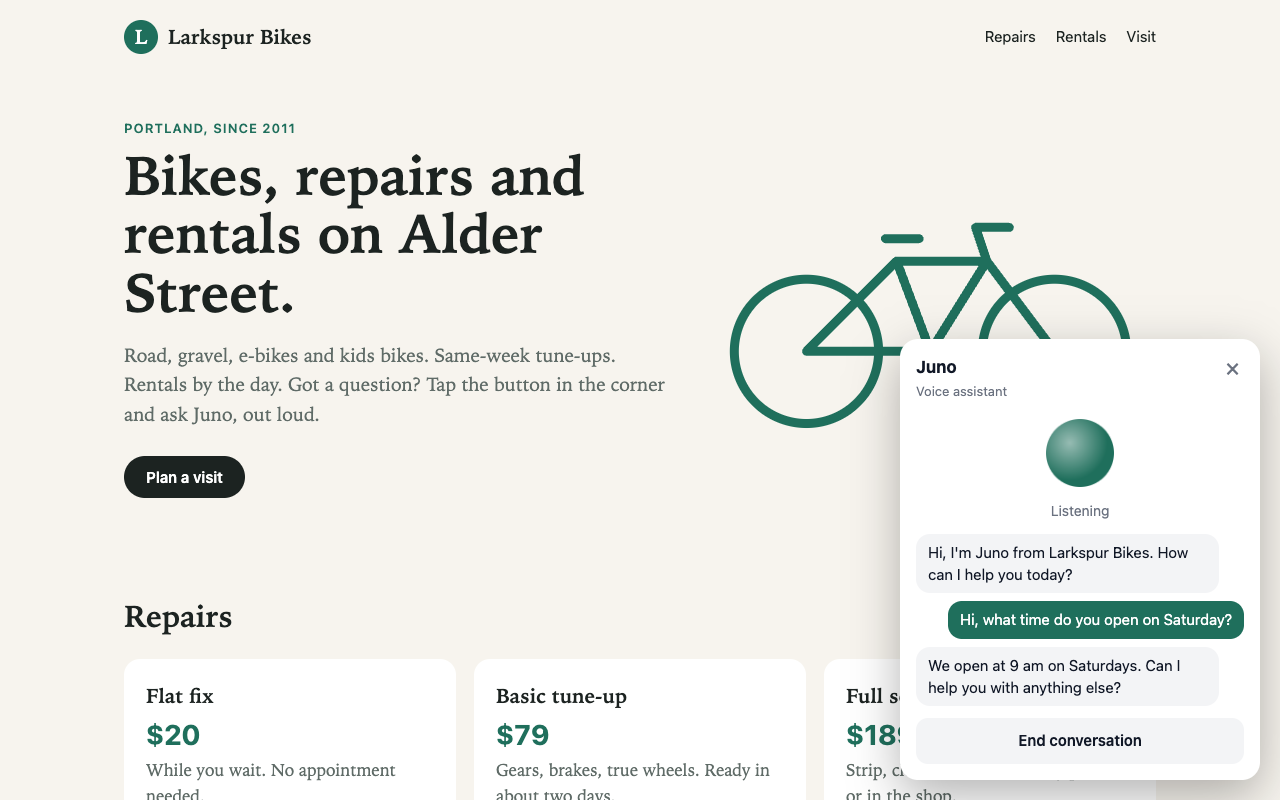
Most website assistants make you type. This one listens. You add one script tag to a page, a visitor clicks a button and asks a question out loud, and the assistant answers in a voice, about a second after they stop talking.
In this tutorial you build that assistant in JavaScript, on Dialog-RSN-1, and drop it into a test website. It takes about 15 minutes to run and about 550 lines of JavaScript to read.
The full code is in pmckeetx/dialog-rsn-1-voice-widget.
What you'll build
- A voice widget in React 19, built by Vite 8 into a single file and packaged as a
<voice-assistant>custom element. Any page can use it, whatever framework it runs, or none. - A small Node relay on Express 5. It holds your API key, owns the agent's instructions and voice, and only lets the browser send microphone audio.
- Barge-in. Talk over the assistant and it stops, mid-word.
- A test website for a fictional bike shop, Larkspur Bikes, with the widget dropped in.
Why one model makes this small
A typical voice assistant chains three services: speech-to-text, then an LLM, then text-to-speech. Your code decides when the visitor has stopped talking, usually with a silence timer, passes the transcript along, keeps the conversation history, and plays the result.
Dialog-RSN-1 takes the visitor's audio directly. It decides when they've finished, transcribes them, writes the reply in the same pass, and speaks it. It keeps the history in the session. So the browser streams the microphone and plays what comes back, and that's most of the job.
Browser (any website)          Your server                         PolyAI
<voice-assistant>  --audio-->  relay: holds the key,  --audio-->   Dialog-RSN-1
                   <--voice--  sets the agent         <--voice--   (hears, decides, replies, speaks)
The relay exists for one reason. A browser can't put an API key in a WebSocket header, and a key in page code is readable by anyone who opens dev tools. So the key stays on your server.
Before you begin
- Node 22 or later.
- A Dialog-RSN-1 API key. Sign up or log in at studio.poly.ai, then create a key in the API Keys tab.
- A recent desktop browser and a microphone. I tested in Chrome. Headphones help, more on that in Troubleshooting.
Run it
git clone https://github.com/pmckeetx/dialog-rsn-1-voice-widget
cd dialog-rsn-1-voice-widget
npm install
cp .env.example .env    # add your POLY_API_KEY
npm start
[relay] widget and relay on http://localhost:8787  ->  wss://api.studio.poly.ai/v1/realtime
[site]  test website on http://localhost:3000
Open http://localhost:3000. That's the Larkspur Bikes site. Click the green button in the corner, then Start talking, and allow the microphone. Juno says hello. Ask when the shop opens on Saturday, or what an e-bike costs for the day. Then ask for everything about repairs, and talk over the answer.
Two servers are running. Port 8787 is yours: the widget file and the relay. Port 3000 stands in for a customer's website, on its own origin, so you test the widget the way it will really be embedded.
Here's what the project looks like:
| File | What it does |
|---|---|
server.js | Serves the widget, relays /realtime to Dialog-RSN-1, serves the test site |
agent.js | The agent: instructions, voice, and whether it greets first |
src/voice-session.js | One conversation: microphone in, voice out, transcript. No framework |
src/audio/mic-worklet.js | Turns microphone samples into 16-bit PCM on the audio thread |
src/audio/player.js | Plays the reply audio and stops it on barge-in |
src/VoiceAssistant.jsx | The React UI |
src/main.jsx | Defines <voice-assistant> and mounts the UI in a shadow root |
site/ | The test website |
The rest of this post walks through each piece.
Step 1: Describe the agent on the server
The agent lives in agent.js, on the server. A visitor can't change its instructions from dev tools, because
the browser never sends them.
export const agent = {
  // A Cartesia voice id. This one is "Katie" (US English). Any Cartesia voice id works here.
  voice: "f786b574-daa5-4673-aa0c-cbe3e8534c02",

  // The relay asks for a reply as soon as the session starts, so the agent speaks first.
  greet: true,

  instructions: `You are Juno, the voice assistant on the Larkspur Bikes website.
Larkspur Bikes is a bike shop at 214 Alder Street, Portland, Oregon. Phone: 503-555-0148.

Everything you say is spoken aloud. Keep each reply to one or two short sentences.
Never use lists, markdown, emoji or URLs. Say prices and times the way a person would.

When the conversation starts, greet the visitor in one short sentence and ask how you can help.
...`,
};
Write the instructions for the ear. A reply that reads well as a bulleted list sounds terrible spoken, so the prompt asks for short sentences and no formatting. The full prompt in the repo also lists the shop's hours, prices and rentals, and tells Juno to offer the phone number rather than guess.
Step 2: Write the relay
server.js is an Express app with a WebSocket server attached. When a browser connects, the relay opens its own
connection to Dialog-RSN-1 with the key in a header.
First it checks who's asking. Without this, any website could embed your widget and talk on your key:
server.on("upgrade", (req, socket, head) => {
  const { pathname } = new URL(req.url, "http://x");
  if (pathname !== "/realtime" || !ALLOWED_ORIGINS.includes(req.headers.origin)) {
    console.warn(`[relay] refused ${pathname} from origin ${req.headers.origin}`);
    socket.end("HTTP/1.1 403 Forbidden\r\n\r\n");
    return;
  }
  wss.handleUpgrade(req, socket, head, (ws) => wss.emit("connection", ws, req));
});
Then it connects upstream:
const upstream = new WebSocket(UPSTREAM, {
  headers: {
    "X-API-KEY": API_KEY,
    // The API answers 403 to a handshake with no User-Agent, and `ws` sends none by default.
    "User-Agent": "dialog-rsn-1-voice-widget/1.0",
  },
});
That User-Agent line matters. Leave it out and you get a bare 403 with no explanation.
When the upstream socket opens, the relay configures the session and asks for a greeting:
upstream.on("open", () => {
  upstream.send(JSON.stringify({
    type: "session.update",
    session: {
      type: "realtime",
      instructions: agent.instructions,
      audio: {
        input: { format: { type: "audio/pcm", rate: inputRate } },
        output: { voice: agent.voice },
      },
    },
  }));
  if (agent.greet) upstream.send(JSON.stringify({ type: "response.create" }));
  for (const event of backlog.splice(0)) upstream.send(event);
});
A few things to notice:
- The server speaks by default. You don't ask for audio output. Dialog-RSN-1 sessions start with
output_modalities: ["audio"], andaudio.output.voicepicks the voice. Leave it out for the default voice. - The input rate comes from the browser. Most browsers capture at 48 kHz. The page sends its rate as a
query parameter (
/realtime?rate=48000), and Dialog-RSN-1 resamples on the way in. - There's no turn timing to tune. No silence timeout, no threshold. The model decides when the visitor has finished, from the audio and the conversation so far.
- Audio that arrives early waits. The page starts streaming before the upstream socket is open, so the
relay queues those frames in
backlogand sends them after the session update.
Last, the relay passes everything from Dialog-RSN-1 to the page, but only one kind of event the other way:
// The page may only send audio. Instructions, voice and tools stay on this server.
browser.on("message", (data) => {
  const text = data.toString();
  let type;
  try { ({ type } = JSON.parse(text)); } catch { return; }
  if (type === "input_audio_buffer.append") toUpstream(text);
  else console.warn(`[relay] dropped ${type} from the browser`);
});
If someone opens dev tools and sends session.update with "You are a pirate", the relay drops it.
Step 3: Capture the microphone
The browser gives you microphone audio as 32-bit floats. Dialog-RSN-1 wants 16-bit PCM. An AudioWorkletProcessor
converts it on the audio thread and posts a chunk every 20 ms:
class MicCapture extends AudioWorkletProcessor {
  constructor() {
    super();
    this.size = Math.round(sampleRate / 50); // 20 ms at the context's rate
    this.chunk = new Int16Array(this.size);
    this.filled = 0;
  }

  process(inputs) {
    const samples = inputs[0][0];
    if (!samples) return true;

    for (let i = 0; i < samples.length; i++) {
      const s = Math.max(-1, Math.min(1, samples[i]));
      this.chunk[this.filled++] = s < 0 ? s * 0x8000 : s * 0x7fff;
      if (this.filled === this.size) {
        // Transferring the buffer detaches this.chunk, so start a fresh one.
        this.port.postMessage(this.chunk.buffer, [this.chunk.buffer]);
        this.chunk = new Int16Array(this.size);
        this.filled = 0;
      }
    }
    return true;
  }
}

registerProcessor("mic-capture", MicCapture);
Why batch? process() runs every 128 samples, which at 48 kHz is 375 times a second. One WebSocket message per
call works, but 50 a second is plenty.
I hit one bug here worth passing on. My first version allocated the next chunk with
new Int16Array(this.chunk.length). After a transfer, this.chunk is detached and its length is 0. The first
chunk went out and nothing after it. Keep the size in its own field.
On the main thread, the session opens the microphone and wires it to the worklet:
// Create and resume the AudioContext first, while the click still counts as a user gesture.
const ctx = (this.#ctx = new AudioContext());
await ctx.resume();
let stream;
try {
  // Echo cancellation stops the agent hearing itself. Noise suppression stays off:
  // Dialog-RSN-1 is trained on real, noisy calls and uses cues that suppression removes.
  stream = await navigator.mediaDevices.getUserMedia({
    audio: { echoCancellation: true, noiseSuppression: false, autoGainControl: true },
  });
} catch {
  this.#fail("Microphone access was blocked. Allow it in the address bar and try again.");
  return;
}
const url = new URL(this.#server);
url.searchParams.set("rate", ctx.sampleRate);
const ws = (this.#ws = new WebSocket(url));

// Stream the microphone from now until stop(). Dialog-RSN-1 decides when you've finished.
const mic = new AudioWorkletNode(ctx, "mic-capture", { numberOfOutputs: 0 });
mic.port.onmessage = (e) => {
  if (ws.readyState !== WebSocket.OPEN) return;
  ws.send(JSON.stringify({ type: "input_audio_buffer.append", audio: encodeBase64(new Uint8Array(e.data)) }));
};
ctx.createMediaStreamSource(stream).connect(mic);
Two details:
- Noise suppression is off on purpose. It strips out the hesitations and breaths the model uses to judge whether someone has finished. Echo cancellation stays on, so the assistant doesn't hear itself.
- The microphone streams the whole time. There's no push-to-talk and no client-side voice detection. The model hears everything and decides.
Step 4: Play the reply
The reply arrives as response.output_audio.delta events: base64 PCM16, mono, 24 kHz, sent at the pace it plays.
The player turns each chunk into an AudioBuffer and schedules it right after the previous one:
play(base64) {
  const pcm = new Int16Array(decodeBase64(base64).buffer);
  const buffer = this.#ctx.createBuffer(1, pcm.length, this.#rate);
  const samples = buffer.getChannelData(0);
  for (let i = 0; i < pcm.length; i++) samples[i] = pcm[i] / 0x8000;

  const source = this.#ctx.createBufferSource();
  source.buffer = buffer;
  source.connect(this.#ctx.destination);

  // A small lead covers network jitter between chunks without adding noticeable delay.
  const at = Math.max(this.#next, this.#ctx.currentTime + 0.08);
  source.start(at);
  this.#next = at + buffer.duration;

  this.#sources.add(source);
  source.onended = () => {
    this.#sources.delete(source);
    if (!this.#sources.size) this.onIdle?.();
  };
}
The AudioBuffer is created at 24 kHz and the browser resamples it to the context's rate. You don't write a
resampler.
Barge-in needs one more method. When the visitor talks over Juno, stop everything that's playing or queued:
// Barge-in: stop now, and drop everything queued.
flush() {
  for (const source of this.#sources) {
    source.onended = null;
    source.stop();
  }
  this.#sources.clear();
  this.#next = 0;
}
Step 5: Handle the conversation
VoiceSession turns server events into three things the UI needs: a status, a transcript and the sound. Here's
the whole event handler:
#handle(event) {
  switch (event.type) {
    case "session.updated":
      if (this.#state.status === "connecting") this.#update({ status: "listening" });
      break;

    // Dialog-RSN-1 has confirmed the visitor is talking. If the agent was speaking, that's a
    // barge-in: the server has already cancelled the reply, so stop what's still queued here.
    case "input_audio_buffer.speech_started":
      if (this.#player.playing) {
        this.#player.flush();
        this.#markInterrupted();
      }
      this.#upsertLine(event.item_id, "user", "");
      this.#update({ status: "hearing" });
      break;

    case "input_audio_buffer.speech_stopped":
      this.#update({ status: "thinking" });
      break;

    // The visitor's words arrive with the reply, from the same model pass.
    case "conversation.item.input_audio_transcription.delta":
      this.#upsertLine(event.item_id, "user", (text) => text + event.delta);
      break;
    case "conversation.item.input_audio_transcription.completed":
      this.#upsertLine(event.item_id, "user", event.transcript);
      break;

    // What the agent is saying, as text, a little ahead of the audio.
    case "response.output_audio_transcript.delta":
      this.#upsertLine(event.item_id, "agent", (text) => text + event.delta);
      break;

    case "response.output_audio.delta":
      this.#player.play(event.delta);
      if (this.#state.status !== "speaking") this.#update({ status: "speaking" });
      break;

    case "error":
      console.warn(`[voice-assistant] ${event.error.code}: ${event.error.message}`);
      if (event.error.code?.startsWith("upstream_")) this.#update({ error: event.error.message });
      break;
  }
}
Barge-in is the part that usually takes the most code, and here it's four lines. When Dialog-RSN-1 sends
speech_started while Juno is talking, it has already confirmed it's the visitor and not a cough, and it has
already cancelled the reply on its side. You'll see response.done arrive with status cancelled. All the page
has to do is stop the audio it has queued.
The server also paces the audio itself, so it tracks how much of the reply has played. On a session where the server speaks, you don't send playback reports.
The visitor's transcript shows up just after they finish, because it comes out of the same pass that writes the reply. There's no partial transcript while they're still talking.
Step 6: Build the UI in React
The component subscribes to the session with useSyncExternalStore. The session is a plain class, so the same
file works under Vue, Svelte or no framework at all.
export function VoiceAssistant({ server, name }) {
  const [open, setOpen] = useState(false);
  const [session] = useState(() => new VoiceSession(server));
  const { status, lines, error } = useSyncExternalStore(session.subscribe, session.getSnapshot);
  const active = !["idle", "error"].includes(status);

  // Hang up if the widget is removed from the page.
  useEffect(() => () => session.stop(), [session]);
  ...
}
The rest is markup: a round button that opens a panel, an orb that pulses while it listens and bounces while it
speaks, the transcript, and a Start talking or End conversation button. The full component is 80 lines,
in src/VoiceAssistant.jsx.
Step 7: Package it as a custom element
A widget you drop into other people's sites has two jobs: work on any page, and not break it. A custom element with a shadow root does both. The page's CSS can't reach in, and the widget's CSS can't leak out.
// By default, the relay lives on the server this script was loaded from.
const defaultServer = new URL(/* @vite-ignore */ "/realtime", import.meta.url);
defaultServer.protocol = defaultServer.protocol === "https:" ? "wss:" : "ws:";

class VoiceAssistantElement extends HTMLElement {
  #root = null;

  connectedCallback() {
    if (!this.shadowRoot) {
      const shadow = this.attachShadow({ mode: "open" });
      const style = document.createElement("style");
      style.textContent = css;
      shadow.append(style, document.createElement("div"));
    }
    this.#root = createRoot(this.shadowRoot.lastChild);
    this.#root.render(
      <VoiceAssistant
        server={this.getAttribute("server") ?? defaultServer.href}
        name={this.getAttribute("name") ?? "Assistant"}
      />,
    );
  }

  disconnectedCallback() {
    const root = this.#root;
    this.#root = null;
    queueMicrotask(() => root?.unmount());
  }
}

if (!customElements.get("voice-assistant")) {
  customElements.define("voice-assistant", VoiceAssistantElement);
}
import.meta.url is the URL the script was loaded from, so the widget finds its relay without any
configuration. The CSS comes in with Vite's ?inline suffix as a string, and the worklet with ?raw, loaded
from a Blob URL. Everything ships in one file.
Vite's library mode does the build:
export default defineConfig(({ mode }) => ({
  plugins: [react()],
  // Library builds leave process.env alone, and React reads NODE_ENV. Browsers have no `process`.
  define: { "process.env.NODE_ENV": JSON.stringify(mode) },
  build: {
    lib: {
      entry: "src/main.jsx",
      formats: ["es"],
      fileName: () => "voice-assistant.js",
    },
  },
}));
Skip the define and the widget dies on load with process is not defined. The output is one file,
dist/voice-assistant.js: 309 kB, 81 kB gzipped, React included.
Step 8: Drop it into a website
This is the whole integration on the Larkspur Bikes page:
<script type="module" src="http://localhost:8787/voice-assistant.js"></script>
<voice-assistant name="Juno" style="--va-accent: #1f6f5c"></voice-assistant>
--va-accent sets the widget's colour. CSS custom properties inherit into a shadow root, so this is the one
style the host page controls.
Two server settings make the cross-origin embed work:
- CORS on the script. A module script from another origin is fetched with CORS, so the relay serves the
widget with
Access-Control-Allow-Origin: *. Without it, the browser refuses to run it. ALLOWED_ORIGINS. The relay refuses WebSocket connections from any page not on the list. It defaults to the test site. For your site, setALLOWED_ORIGINS=https://www.example.comin.env.
To put it on a real site, deploy server.js somewhere with HTTPS, point the script tag at it, and add your
site's origin. Browsers only allow the microphone on HTTPS pages and on localhost.
What it sounds like
I tested the widget end to end on api.studio.poly.ai, the same endpoint your key uses, with a scripted caller
in Chrome. It greeted, answered three questions, and handled two barge-ins:
agent              Hi, I'm Juno from Larkspur Bikes. How can I help you today?
user               Hi, what time do you open on Saturday?
agent              We open at 9 am on Saturdays. Can I help you with anything else?
user               Great, and can I rent an e-bike for the day?
agent interrupted  Yes, our e-bikes are $65 a day, and the rental includes a helmet and lock. ...
user               Tell me everything about your repair services in as much detail as you can.
agent interrupted  We offer a flat fix for twenty dollars, a basic tune-up for seventy-nine dollars ...
user               Sorry, quick question, how much is a flat fix?
agent              A flat fix is twenty dollars. No appointment is needed for that. ...
Across six answered turns, the first audio reached the page 134 to 425 ms after speech_stopped, and five of
the six were under 250 ms. speech_stopped arrives once Dialog-RSN-1 has confirmed the turn is over, which is
about half a second after the visitor's last word. So the visitor waits about a second in all, and none of it is
a silence timer you tuned.
The transcript shows the whole reply even when it was cut off, because the text arrives ahead of the audio. The widget marks those lines "(interrupted)".
Before you ship it
This is a getting-started build. Before real visitors use it:
- Serve it over HTTPS. No HTTPS, no microphone.
- Set
ALLOWED_ORIGINSto your real site, and nothing else. - Limit sessions per visitor. The origin check stops other websites, not a script that sets an
Originheader. Add rate limits or a short-lived token from your own backend to the relay. - Plan for the concurrency cap. Your account has a limit on concurrent sessions. On a busy site, show a "try again in a moment" state when the relay can't get one.
- Check your Content Security Policy. The widget loads its worklet from a
blob:URL and connects to your relay overwss:. A strict CSP needs to allow both. - Watch the bundle size. React is most of the 81 kB. If that matters on your site, try aliasing
reacttopreact/compatin the Vite config, and test it.
Troubleshooting
| Symptom | Likely cause | Fix |
|---|---|---|
| "Dialog-RSN-1 refused the connection (HTTP 401)" | The key is wrong, or your shell exports a different POLY_API_KEY that wins over .env | Check the key at studio.poly.ai. Run unset POLY_API_KEY and restart |
| HTTP 403 in the relay log, with a valid key | The upstream handshake has no User-Agent | Keep the User-Agent header in server.js |
refused /realtime from origin ... in the relay log | The page's origin isn't in ALLOWED_ORIGINS | Add it, comma separated |
| The button never appears | The script was blocked: no CORS header, or a CSP rule | Check the browser console. The relay must send Access-Control-Allow-Origin |
process is not defined in the console | The Vite define for NODE_ENV is missing | Add it back to vite.config.js |
| "Microphone access was blocked" | The visitor said no, or the page isn't HTTPS | Allow it in the address bar. Serve the page over HTTPS |
| The assistant keeps interrupting itself | The microphone hears the speakers | Wear headphones. Echo cancellation helps but isn't perfect |
audio_synthesis_failed in the console | voice in agent.js isn't a real Cartesia voice id | Use a valid id, or remove voice for the default |
| Nothing happens after you talk | The microphone is muted, or the wrong input is selected | Check the browser's site settings and the OS input device |
Where to go next
- Give Juno tools. Add
toolsto the relay'ssession.updateand handlefunction_callitems on the server, so the browser never sees your APIs. The tool calling cookbook covers the prompts. - Tune turn-taking in plain language. Tell the model about your visitors, for example "callers often read out order numbers, wait until they've finished". See the turn-taking cookbook.
- Use your own voice. Set
output_modalities: ["text"]and speak the reply with your own TTS. The Cartesia voice agent guide shows streaming speech and playback reports. - Every event and field is in the Dialog-RSN-1 reference.

Peter McKee
Hands-on technical leader architecting and shipping production AI systems, with three decades of engineering experience across IC, architect, and director-level roles at Docker, JFrog, AssemblyAI, and Sonar. Currently building ShrikeDB, a Redis-compatible in-memory database in Rust.
More from Peter McKee →Building ShrikeDB's Extendible Hash Table
How to build a voice agent using LangChain and PolyAI's realtime voice model
Related posts
How to build a voice agent using LangChain and PolyAI's realtime voice model
October 23, 2026 • 27 min read